After several weeks of tough struggle and failure I was able to reach an acceptable point in my personal cartoon rig project.
This post will try to explain the process and reasoning that lead to this result.( In the coming weeks i will try to finish some previous article on this blog, and share new tools on creative crash or github.)
(above: unbreakable deformation system for cartoon character)
1) Building rig from simple tools : layering elements by function
( above : some broad concepts on character articulation, and solutions I tried to find in order consolidate the puppet building workflow )
a) Aim quaternion node :
e
b) Custom articulation Curve and pathSegment node : driving large array of bones efficiently.
e
c) Brute force pose space deformation : a look at corrective shapes database handling
( first look at the leg deformation system: notice the quaternion controller which defines a default twist value)
e
2) Writing toon oriented deformer: a math-less method.
e
Over the last months I was busy writing and playing with specialized rigging and deformation nodes for maya .
I asked my former mentor at rigging dojo, Brad Clark, some advices on my newly released programming reel. He gave me a really helpful insight on my spline deformer and ask how will it behaves on a full blow creature or character.
I quickly realized that much of the previous tools were proof of concept, that needs further development to be useful in a real world scenario. This was good opportunity to apply my research on practical examples.
( above, the list of character that will be used to test out plugins and tools: there is a progression in the difficulty to articulate them, going from pure cartoon , to caricature and realistic model )
1) Hall of fame ( full credit list disclosure…) :
Most of the time when I recycle a model I try to tweak it by working on its topology , proportion, or form .
The following images will describe what was done and their original author
Mr Noogles from Brad Clark, works done:
hands and feet consolidation
face retopology and neutral expression
Package Man , Javier Solsona :
ears and nose extensive modification
face retopology and consolidation
hand consolidation
body retopology
Zazar, concept and story from my friend jean-luc Patriat ( Hanuman ) work in progress:
initial model : cedric bazillou
tail and cloth removal
anatomy detail from various free model
tweaking and consolidation
Female model found on pixologic forum ( contact me if you know the author, to give him/her well deserved credit ( you rules man…) )
2) Integrating topology varying limbs in character puppet:
To test out rubber hose arm and leg it was obvious to search a simple cartoon character where extreme stretchable limb was part of the design.
On this character the main shapes are easily identified :
The torso mimic the form of an inverted water drop
the face mask is placed on the upper portion of the body and seems to slide along the torso surface.
For this project the hands and feet were rebuilt , an equal number of faces were also distributed along the character limbs.
You can also see from the original mesh on the left that I did an extensive work on the face to have a neutral starting point( the asymmetrical feature of the face works great and gives this character an insane expression) .
To reach my goal I though of splitting its body into meaningful regions.The arm , spine and leg were to be stretchable but i wanted to avoid the most common mistake done by average rigger: skewing large portion of the shoulder or hips when a limb length increase or shrink.
The light salmon color faces will be deformed by my custom spline deformer,when stretched this region will automatically increase its edge subdivision along the curve length.
The other faces will use regular basic skinning and extensive pose space deformation.
3) Taming ankles: teaching toon how to tilt
One common test I perform to check how the ankle region behaves , is to tilt a character a la “smooth criminal”. Above we can see Michael Jackson leaning at an angle of 40 degrees, which in itself is already spectacular, but for a cartoon is not enough.
(above: the feet are firmly planted on the ground demonstrating an unbreakable deformation rig)
To reach this goal I work a couple of days in order to update 2 tools featured in a previous article :
the sextant and hemisphere node.
It was important to script the the corrective shape setup as well to have a general tool to manage and update the required corrective shapes.
( above: you can see the ankle describing a circle and the combination of up and left side will push the foot on the left side)
After my previous experiment ,failure and disappointment in pose space deformation , I wanted to try other method to do the correctives shapes:
encoding a predefined orientation into the articulation .
The result was more pleasing and easy to achieve :
the setup start with 4 shapes up/ down then right/left
at this stage the space is divided into 2 or 3 ( depending on the granularity that is needed for a creature ), each subspace being dependent to the previous one
the last 16 shapes(in pink in the image ) will be used to enable a smooth blending between this set of target key pose.
Less shape were also needed by using comet pose deformer on top of the skin cluster: as an additive offset the vertex are inheriting the arc motion of the joints influencing them ,producing a smoother interpolation.
4) geodesic wrist : an animator-proof articulation…
Above: Range of motion for the wrist, notice the smooth interpolation of the corrective shapes that distributes the edges of the mesh evenly.
The correctives shape embed a predefined torsion value into several key poses in order to have beautiful deformation when the wrist is locked and before a second twist layer is added to the forearm.
After playing a lot with spherical coordinates I wanted to try another workflow to interpolate and create corrective shapes.Instead of stacking the influence of all shapes , only 3 morphs would be active at any time.
To compute vertex weight the most easy way was to extract from a ray/mesh intersection the barycenter value . Other type of interpolation( UV based, face sweeping etc ) is also possible with this method and can be a viable alternative to simple vector angle based poseReader.
(Above: the 16 corrective shapes used for this wrist : the triangulated mesh in the center of the image output vertex weights that are linked to their related key pose )
b) Elbow deformation with custom trigger node:
Range of motion for this character elbow : beyond 130 degrees the forearm starts to collide with the biceps and push the flesh on the side and on the back
A better view for the arm bulging: on this example simple correctives shapes define the overall deformation , but a self collision plane can be used to trigger animated weights for the last shape.
In this article I will talk about a really common procedure that can be found in today character rig: space switching or dynamic parenting.
All the following story started after reading a post on maulik blog. His attempt at writing a group Constraint made me want to see if I would be able to came up with a stable implementation in order to use less nodes and provide a more streamlined workflow .
1) Once upon a rig…:
At its core , space switching or dynamic parenting is rooted on animation constraint: the basic idea is to link an object to several “parent” and to be able to transfer this child between parent over time.
This system is usually build to keep track over which driver takes precedence in controlling an object by:
managing the constraint creation ( setting up additional meta data, connecting message attribute to retrieve node and parents easily )
baking the difference of position and orientation when user want to attach an object to a different “parent” .
computing weight value for each driver linked to constraint node .
My first encounter with this concept was from maya meister Alex Alvarez’s gnomon legacy DVD, and Chris Landreth’s no Sensei material( maya techniques: Ryan making off). Much more information can also be found in Jason Schleifer’s Animator Friendly Rigging DVD .
In Maya a joint hierarchy can be split by function:
the deformation rig will structure all the joint/deformer and additional setup needed to convey a creature skin appearance.
the animation rig bring all the tool and functionality to breath life to a character through movement .
Several duplicate hierarchy ( that can sometimes be different than the bound skeleton rig ) can be used as animation driver for a joint chain: one chain can be use in FK mode another in IK etc…
(In 3dsmax, things can be different , as we can stack different controller in list to achieve the same effect ).
2) Current trends and methodology:
Several solution were developed and showcased using maya element like scriptNode, setDrivenKey, custom scripts.
zoo space switching by Hamish McKenzie ( a guide can be found on David Johnson blog )
An intesting tool by john Patrick ( script can be foundhere )
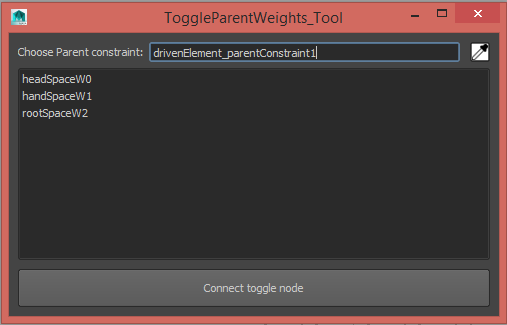
You can see in the UI two tabs : the first one deals with the setup of the switch, and the animation tabs compute the required offset to prevent the driven node to jump in space.
On the channelBox , users can select from an enumerate attribute the animation driver( the same principle is valid for space switching)
( Above TD-Matt explains to great length how to setup a space switch with regular maya node )
You can also setup custom marking menu to have a faster access to the parent selection( above rig from Lee Zhen Yang demo reel ).
Each of these tools respect the overall principle of space switching, but what is interesting is how TD tackle the same problem in their day to day work , sometimes in a creative different way.
3) Advanced systems:
a – “Broken hierarchy” and motion isolation:
(Snapshot from Maya techniques: Custom character Toolkit, click on the the image for full size )
In this presentation(AWGUA Siggraph 2003 – Maya Master Class Seminar!! ), Erick Miller and Paul thuriot talked about various techniques to build a character pipeline: one of them was the use of broken hierarchy.
This system relies heavily on a base rig, a regular hierarchy of joints where:
every child is connected to the appropriate place,
the transformation are frozen
the joint orientation and rotation order are setup in a coherent manner.
Down the animation pipeline, this base rig will then be bound to a control rig. This asset is generally used by animators with low resolution cut off version of creature mesh, and featured several element to assist artist to pose a puppet in the desired configuration: IK controls, FK mode to achieve better arc or presets ( like slider and offset group for hand position , pose library to manage face expressions ,etc))
–> control rig driven by cut off portion, patch back a parent socket with orient/position constraint: encourage modularity, cleaner scene organization
–>( premise of procedural modular rigging system )
b – Human IK, MotionBuilder and full body IK solver:
–> the IK / FK control rig that can be aligned automatically
c-Bi-Directional Constraints and dependency graph hacking:
2 master classes on BiDirectionalConstraining
turn and enhanced into a commercial application –> exotool
d-Modular character system:
–> jan berger mvc system, bidirectional contraint/ exotool, mobu ik solver, full body IK( to be continued …)
on the fly, relashionship modification
(to be continued)
4) Current implementation and workflow:
The core of this project was to write a python scripted plugin in order to do the heavy matrix math lifting . Once created this node is managed by 2 python class nicely wrapped( i hope so ) in a script file.
The first step for the user is to initialize a new spaceswitchNode for a transform node
To initialize a new spaceswitchNode the user has to use a popup menu to explicitly do that action , much like a constraint node it doesn’t make sense( but is still possible ) in maya to layer this type of node hence once a switchNode is linked to an object the UI will not display this menu anymore .
Most of the time ( for obvious time constraint and budget ), I write plain and “simple” user interface with regular maya controls and layout. This time i wanted to try a resizable and dockable tool . With the supremacy of wide screen nowadays it made sense to have a vertical layout to have a minimal footprint on the user workspace .( in scripting term this means messing with a formLayout in order to attach control between each other or to the edge of a parent container )
The first tool accessible is used for the parent setup. Here you can add and remove object that will act as parent. The UI will filter from a selection the objects that will cause a cycle in the system ( either by undoing or disconnecting the unstable input )
As a convention the node start to be active when at least one “parent” is connected . The first time this condition is met, an offset group is inserted in the driven object hierarchy and received the switch node translate and rotate output value.For the same reason ( and also to limit the amount of code needed to release this tool ),the UI doesn’t allow the average user to change the order of the parent or delete the first one.
In the second part of the UI , the user has access to different tool to change the parent that will influence the driven object. In most case this UI is not mandatory , as this action can be done( with the attribute editor or in the channelBox ) by simply changing the index number of the parent driver.
The node also doesn’t rely on absolute number to work : the user may have connect 5 parent at the following index : [3,7,11,12,20], and in this case index 0 will means the first number ( 3 ) in this list.
The “Key Driver Index” index will ensure that key will be added with a stepped tangent, and “Key parent Transform” will key all the parent connected to the spaceswitch node at each switching frame
( A cleaner node network, matrix attributes are feeding the spaceswitch node which then feeds the offset group rotate and translate channel)
5) Basic algorithm and tricky limitation that were overcome :
As usual , I started this project by doing a prototype with regular nodes and simple python scripted plugin. Using a constraint is equivalent to “translate” the information of an object into the space of another and this operation often involves matrix multiplication.
In this configuration where two object live in worldspace ( they have no parent ) the locator drives the cube mesh in the simplest manner : its world spatial state information is separated into translate / rotate / scale information (using the default rotation order ).
When the driven object is part of a hierarchy this setup needs to be modified slightly: these spatial transformation value must be convert into the parent space.
This what the multMatrix node is used for:
multiplying the world matrix of the locator by the parent inverse matrix of the driven cube( in the correct order ).
More information on practical matrix usage in CG and 3d application can be found in:
David Gould’s Complete maya programming
Borislav Petrov’s The Matrix Explained at cgAcademy.net
The first graph and procedure was matching an object to only one target, it was only logical to extend it to cope with multiple parent.
One important difference with a constraint node is that a switchNode doesn’t need to blend the contribution of each parent based on a weight value: the current parent fully influence the driven object.
The choice node was then an ideal candidate for this task: with a generic attribute as input and output, creative TD can plug mesh, curve, numeric value, vector or matrices to complete this network.
The last part of the work was to maintain the distance and orientation as the driven object was jumping from one space to another.
This information can also be store as a matrix and is extracted with the world matrix of the driven object and the parent inverse matrix of the future parent.
From a practical standpoint , maya provide a node that compute a matrix from 16 numbers if you need to dynamically change it or can create and write a regular matrix as a storage solution.
It is also funny to see the same functionality reflected in the API:
import maya.cmds as cmds
import maya.OpenMaya as OpenMaya
util = OpenMaya.MScriptUtil()
drivenWorldTM = OpenMaya.MMatrix()
parenHolderINVMAT = OpenMaya.MMatrix()
worldState = cmds.getAttr('%s.worldMatrix[0]'%drivenNode )
inverseParentState = cmds.getAttr('%s.worldInverseMatrix[0]'%holderNode )
util.createMatrixFromList(worldState,drivenWorldTM)
util.createMatrixFromList(inverseParentState,parenHolderINVMAT)
offsetMatrix = drivenWorldTM*parenHolderINVMAT
offsetMatrixValue = []
for row in range(4):
for clm in range(4):
offsetMatrixValue.append(offsetMatrix(row,clm))
cmds.setAttr('%s.bindMatrix'%switchNode,offsetMatrixValue,type='matrix')
This code snippet extract an offset matrix by using regular commands and API function.( In the near future It will be more clear why this offset matrix was named bindMatrix )
ee
(Above: the final node network , click the image to see it in full size )
When you animate the parent driver index , you must use a script to compute an offset matrix and add / overwrite one element in a second choice node. 6) Time context, frame cache and switch consolidation:
a) First draft analysis:
( above : list of all the attributes used by this node )
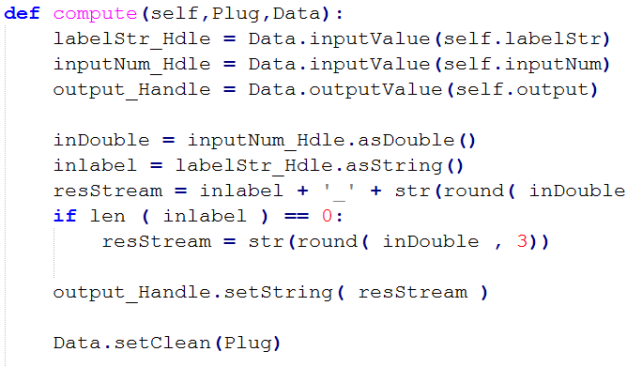
Building a node which replicates this network functionalities was quite easy. Only 2 additionnal elements were needed to make it works in a compute method :
a bindMatrix
and a previous index attribute.
The previous index attribute was the most obvious addition. Each time the user choose to change the parent driver index , this action will refresh an internal offset matrix . and is done by having a point of reference to do a simple comparison
oldDriverIndex = bakeIndex_Handle.asShort()
if oldDriverIndex != driverIndex_Val:
bakeIndex_Handle.setShort(driverIndex_Val)
bakeIndex_Handle.setClean()
#refresh the offset matrix attribute here
You can immediately notice that to have a sense of memory the node reads the value of an output data handle (bakeIndex_Handle) which is legal and dont refresh maya dependency graph.
The bindMatrix concept was more fun to implement as the initial concept needs to be compatible with maya architecture:
Most people request or use constraint with an external object to grab the driven object spatial informations.
In a node this lead to a cyclic dependency and leads to unstable behavior( node must operates on data from its own input attributes, this doesn’t mean developer can go outside their node but involves a more cautious approach )
My solution for this problem was found from one simple observation : the offset matrix combined with the current parent worldMatrix always returns a value in world coordinates, thus querying outside element were unnecessary.
This bindMatrix sole purpose was then to pass an initial state for the internal offset matrix and can also be used in an override mode.
b) Unexpected limitation:
As soon as this draft was finished I did a test with a simple cube animation. I was disappointing to see that the switch condition already implemented was clearly weak :
on some playback condition( when maya reads the last frame and rewind the animation to the first )
or when user jump from one time value to another.
Part of my solution came after studying maya frameCache node (once again) and the animation ghosting tool.
(above: the green cube with a frameCache node reads the animation curve from the attribute translateY of the blue cube: here there is a positive offset of 8 frames )
(Here we can see an interesting implementation: the index in the output array is used as a time offset value)
import maya.OpenMaya as OpenMaya
import maya.OpenMayaAnim as OpenMayaAnim
def get_mobject(node):
selectionList = OpenMaya.MSelectionList()
selectionList.add(node)
oNode = OpenMaya.MObject()
selectionList.getDependNode(0, oNode)
return oNode
def extract_animation_data_from_Plug(nodeName,attributeName):
animfromNode = get_mobject(nodeName)
depFn = OpenMaya.MFnDependencyNode( animfromNode )
PlugObj = depFn.findPlug(attributeName)
attributeIsAnimated = OpenMayaAnim.MAnimUtil.isAnimated(PlugObj)
if attributeIsAnimated == True
animCurveNode = OpenMayaAnim.MFnAnimCurve(PlugObj)
numKeys = animCurveNode.numKeys()
animValues = []
timeList = []
for k in range(numKeys):
keyTime = animCurveNode.time(k)
animValues.append(animCurveNode.value(k))
timeList.append(keyTime.value())
return [animValues,animTimes,timeList]
else:
return None
# usage: animate the translateX value of cube1 created in your scene then invoke:
animData = extract_animation_data_from_Plug('cube1','translateX')
print animData
( Above : code snippet to extract useful information like time/value from an animationCurve , this is what the regular keyframe command do behind the scene )
Although interesting the frameCache node turns to be impractical to use as the driver connected to it will often behaves incorrectly( it will be lock, jumps after mouse release etc… ). This study was important to track the parent index throughout time and guess in the current time range what are the the two parent that was used to compute the current offset matrix.
On the same subject 3d application often have a ghosting option for animated object: this drawing mode enable user to see the state of an object before and after the current frame ( much like legacy hand drawn 2d animation where people were able to stack several layer of paper to judge the spacing between key movement ).
Recently Anzovin studio has release a plugin for this purpose., and a similar node can be found in peter shipkov soup node: the timeOffset node.
What these tools are doing on the most basic level, is taking advantage of maya architecture by querying an attribute value at a different time and can be done this way: